Workforce management that's
accurate, predictable, and people-friendly

Track time, build schedules, manage attendance and expenses, and keep labor costs in check—all from one connected system.

One place for time,
schedules, and labor

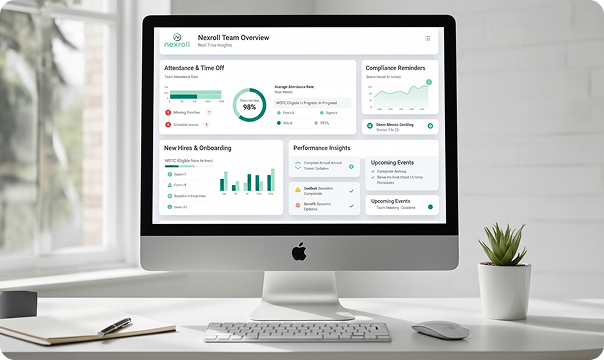
Nexroll brings together time and labor management, employee scheduling, workforce scheduling, and expense management so you can plan confidently and execute every pay period with fewer surprises. Empower employees with collaborative scheduling and give managers real-time visibility into labor costs.

Core Capabilities
Grid

Feature 1:
Automated HR Workflows

Capture hours from web, mobile, or biometric clocks. Enforce rules for overtime and premiums. Feed clean totals directly to payroll with no manual entry required.

Capability 2: Employee Scheduling

Build balanced schedules in minutes and notify employees instantly. Support shift swaps and open shift claiming to improve coverage and boost morale.

Capability 3: Workforce Scheduling

Forecast demand, staff by role and location, monitor coverage gaps, and communicate changes fast. Categorize employees and predict upcoming needs with advanced planning tools.

Capability 4: Expense Management

Submit, approve, and reimburse expenses with receipt capture and policy controls. Keep business rules consistent and speed up reimbursement for happier employees.

Accurate time from anywhere

Eliminate time theft, reduce errors, and ensure compliance with flexible time tracking options that work for every environment—from office to field to remote.
user

Overtime & Premium Pay

  • Automatic calculation of daily, weekly, and 7th-day overtime
  • State-specific overtime rules (CA, CO, and more)
  • Shift differentials and premium pay rates
  • Meal and break tracking with compliance alerts
  • Real-time overtime alerts for managers

Multiple Clock Options

  • Web-based time clock for office workers
  • Mobile app for remote and field employees
  • Biometric hardware terminals (fingerprint, facial recognition)
  • Badge readers and RFID options
  • Telephone time clock for employees without devices

Location Controls

  • Geo-fencing to restrict mobile punches to approved locations
  • GPS location capture on every mobile punch
  • IP address restrictions for web-based clocks
  • Visual confirmation with photo capture on punch

Manager Approvals

  • Review and approve time cards before payroll
  • Edit punches with audit trails and notes
  • Bulk approval for entire teams
  • Exception reports for missed punches, overtime, and late arrivals
  • Mobile approval from anywhere

Compliance & Audit

  • FLSA compliance tracking
  • Meal and break period enforcement
  • Minor labor law restrictions
  • Union contract rules
  • Complete audit trails for DOL inspections
Build schedules employees actually like

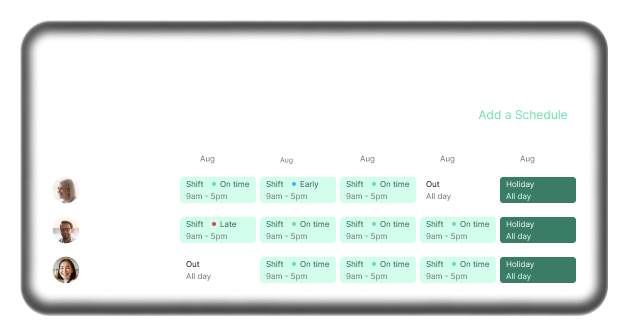
Create schedules in minutes, not hours. Give employees visibility and control over their shifts while maintaining the coverage you need to run your business.

user
block block block block block

Solutions
Grid Section

Nexroll brings together all the tools you need to manage your workforce effectively. Each solution works independently or as part of a complete HCM suite, giving you the flexibility to start where you need and expand as you grow. 

Easy Submission

  • Mobile receipt capture with photo upload
  • Offline mode with automatic sync
  • Automatic data extraction from receipts
  • Expense categorization with dropdown menus
  • Trip and guest expense tracking
  • Mileage tracking with automatic calculation

Approval Workflows

  • Single or multi-level approvals
  • Manager notifications for pending expenses
  • Approve or deny with comments
  • Bulk approval capabilities
  • Mobile approval from anywhere
  • Email and app notifications

Easy Submission

  • Mobile receipt capture with photo upload
  • Offline mode with automatic sync
  • Automatic data extraction from receipts
  • Expense categorization with dropdown menus
  • Trip and guest expense tracking
  • Mileage tracking with automatic calculation

Approval Workflows

  • Single or multi-level approvals
  • Manager notifications for pending expenses
  • Approve or deny with comments
  • Bulk approval capabilities
  • Mobile approval from anywhere
  • Email and app notifications

Fewer surprises on payday

Monitor hours worked, meal and break compliance, missed punches, and exceptions in real-time. Use dashboards and alerts to correct issues before they become payroll problems.

user
Real-Time Alerts
  • Approaching overtime thresholds
  • Missed meal or break periods
  • Late arrivals or early departures
  • Missed punches or incomplete time cards
  • Unauthorized overtime
  • Scheduling conflicts
Exception Management
  • Exception dashboard for managers
  • Automated exception reports
  • Color-coded priority levels
  • One-click resolution options
  • Historical exception tracking
Labor Law Compliance
  • FLSA overtime calculations
  • State-specific break and meal requirements
  • Minor work hour restrictions
  • Predictive scheduling compliance
  • Union contract adherence
  • Recordkeeping for audits
Labor Cost Control
  • Real-time labor cost dashboard
  • Budget vs. actual comparisons
  • Overtime cost tracking
  • Labor cost by department, location, or project
  • Labor cost as percentage of revenue
  • Forecasting and predictive analytics

Everything managers and employees need
in their pocket

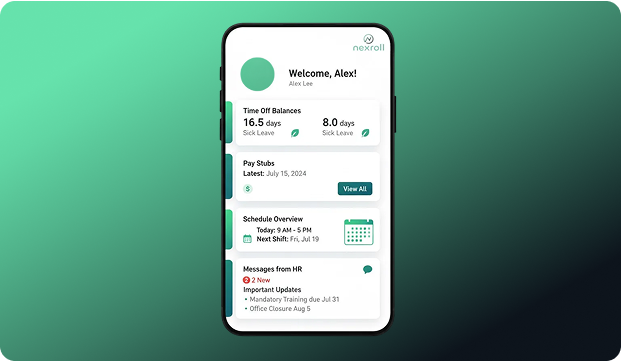
Employees clock in, request time off, view schedules, and submit expenses from mobile. Managers approve time and requests, fill coverage gaps, and check labor cost trends—all while on the floor.

user

For Employees:

  • Clock in/out with GPS verification
  • View schedules and upcoming shifts
  • Request time off and shift swaps
  • Check PTO balances
  • Submit expenses with receipt photos
  • View pay stubs and time cards
  • Receive push notifications for schedule changes
  • Access company directory

For managers:

  • Approve time cards and PTO requests
  • Review and approve expenses
  • View team schedules and availability
  • Fill open shifts
  • Monitor labor costs in real-time
  • Receive overtime alerts
  • Edit time cards with notes
  • Run reports on the go

Mobile App Features:

  • Works on iOS and Android devices
  • Offline mode with automatic sync
  • Biometric login (fingerprint, Face ID)
  • Push notifications for important updates
  • Same experience as desktop version
  • Fast, intuitive interface

Real-time
labor intelligence

Track actual versus budgeted hours, overtime exposure, absence trends, exception counts, and coverage health. Schedule recurring reports or export for finance and operations.

user

Time & Attendance Reports

  • Daily time and attendance summary
  • Time card detail by employee
  • Overtime and premium pay analysis
  • Schedule vs. actual hours worked
  • Missed punch and exception reports
  • Labor distribution by department or location

Labor Cost Reports

  • Real-time labor cost dashboard
  • Budget vs. actual labor cost variance
  • Overtime cost by team or location
  • Labor cost trends over time
  • Predictive labor cost forecasting
  • Cost per unit or transaction

Schedule Reports

  • Published schedule by team or location
  • Schedule adherence tracking
  • Open shift and coverage gap reports
  • Employee availability reports
  • Schedule change history

Expense Reports

  • Expense summary by employee or department
  • Category and purpose analysis
  • Pending approval queue
  • Reimbursement history
  • Policy compliance reports
  • GL export for accounting

Custom Reports

  • Drag-and-drop report builder
  • Filter by date, location, department, or employee
  • Schedule automatic delivery
  • Export to Excel, PDF, or CSV
  • Save and reuse templates
  • Share with stakeholders

Time flows straight to
payroll and accounting

Approved time and expense data feed payroll without rekeying. Labor distribution and job costing export cleanly to your general ledger. One system, one source of truth, no manual syncing.

Payroll
Integration

  • Time automatically flows to payroll after approval
  • No manual data entry or imports required
  • Overtime and premium pay calculated correctly
  • Expense reimbursements included in payroll
  • Real-time payroll preview before processing

Accounting
Integration

  • General ledger export for labor costs
  • Job costing and project allocation
  • Department and cost center tracking
  • Custom GL mapping
  • ntegration with QuickBooks, Sage, NetSuite, and more

Business System Integration

  • Point of sale (POS) systems
  • Project management tools
  • ERP systems
  • Workforce management platforms
  • Third-party time clock hardware

Single
Database

  • All workforce data in one place
  • Employee changes sync instantly
  • No duplicate records or data conflicts
  • Reduced errors and compliance risk
  • Better reporting and analytics

Rollout in weeks,
not quarters

Our implementation team handles setup, configuration, and training so you can start tracking time, building schedules, and managing expenses quickly.

Week 1: Discovery and Policy Mapping
  • Review current time tracking and scheduling processes
  • Define overtime rules and compliance requirements
  • Map locations, departments, and job codes
  • Identify clock-in methods and hardware needs
  • Configure expense policies and approval workflows
Week 2: Configuration
  • Set up locations, roles, and permissions
  • Configure overtime and compliance rules
  • Build schedule templates
  • Set up time clocks and mobile access
  • Configure expense categories and rules
  • Import employee data
Week 3: Admin and Manager Training
  • Administrator training on system configuration
  • Manager training on approvals and scheduling
  • Parallel run with existing system
  • Test various scenarios and workflows
  • Refine configuration based on feedback
Week 4: Go-Live and Post-Launch
  • Employee training and communication
  • Launch time tracking, scheduling, and expenses
  • Monitor first full pay cycle
  • Address questions and issues in real-time
  • Post-launch optimization and fine-tuning
Training Resources:
  • Live training sessions for admins and managers
  • Self-paced video tutorials for employees
  • User guides and documentation
  • Ongoing support and check-ins
  • Best practice recommendations

Flexible plans
for every team

Choose the time and labor essentials or add scheduling, advanced forecasting, and expense management. Pricing scales by employee count and features.

Time & Labor Essentials

  • Web and mobile time tracking
  • Basic scheduling
  • PTO tracking
  • Manager approvals
  • Standard reporting
  • Payroll integration

Time & Labor Plus

  • Everything in Essentials
  • Advanced scheduling with templates
  • Geo-fencing and GPS tracking
  • Overtime alerts and rules
  • Custom reporting
  • Mobile manager tools

Complete Workforce Management

  • Everything in Plus
  • Workforce scheduling and forecasting
  • Expense management
  • Advanced analytics and dashboards
  • Dedicated account manager
  • Priority support

Hardware Options:

Biometric time clocks, badge readers, and tablet kiosks are available for purchase or lease. Contact us for specific hardware recommendations and pricing based on your environment.

Get a Custom Quote

Workforce management
questions answered

laptop

See how businesses
transform HR with Nexroll

Client Name

Company Name

Title

"We were spending 4-5 hours every pay period on payroll. With Nexroll, it takes 15 minutes. The tax filing is automatic, and our employees love the mobile app. Best decision we've made." 

Industry:[Industry]

XXX Employees

Client Name

Company Name

Title

"We were spending 4-5 hours every pay period on payroll. With Nexroll, it takes 15 minutes. The tax filing is automatic, and our employees love the mobile app. Best decision we've made." 

Industry:[Industry]

XXX Employees

Ready to take control
of labor and schedules?

See how Nexroll improves accuracy, coverage, and employee
satisfaction—all from one connected platform.